
This AI video editing agent is the most advanced automated video editor available today. Built into the free Kitty AI Studio desktop app, it creates music videos, edits podcasts with intelligent camera switching, and analyzes raw footage — all automatically. Just chat with the agent and it delivers a finished video.
The First AI Video Editing Agent That Actually Works
Built into Kitty AI Studio, the AI video editing agent generates and edits videos on your behalf. Not suggestions. Not recommendations. It actually opens the timeline and edits. Whether you need music videos from a song and a few images, professionally edited podcasts from multi-camera recordings, or analyzed footage from hours of raw clips — everything happens inside one free desktop application.
And to be clear, this is not another LLM running loose. Behind the scenes, over half a million lines of precisely engineered code guide the AI step by step through the editing process — exactly like a human editor would do it. As a result, it follows editing principles, suggests improvements, and makes corrections automatically.
What The AI Agent Can Do
- Music Videos — Drop a song, provide character references, and the Agent builds the entire video
- Podcast & Interview Editing — Multi-camera sync, speaker diarization, dead air removal, camera switching
- Raw Footage Analysis — Evaluates stability, focus, and content quality from messy clips
- Mass Content Creation — TikTok shorts, Reels, YouTube Shorts at scale
- Image Generation & Storyboarding — Plans scenes, generates images, places them on timeline
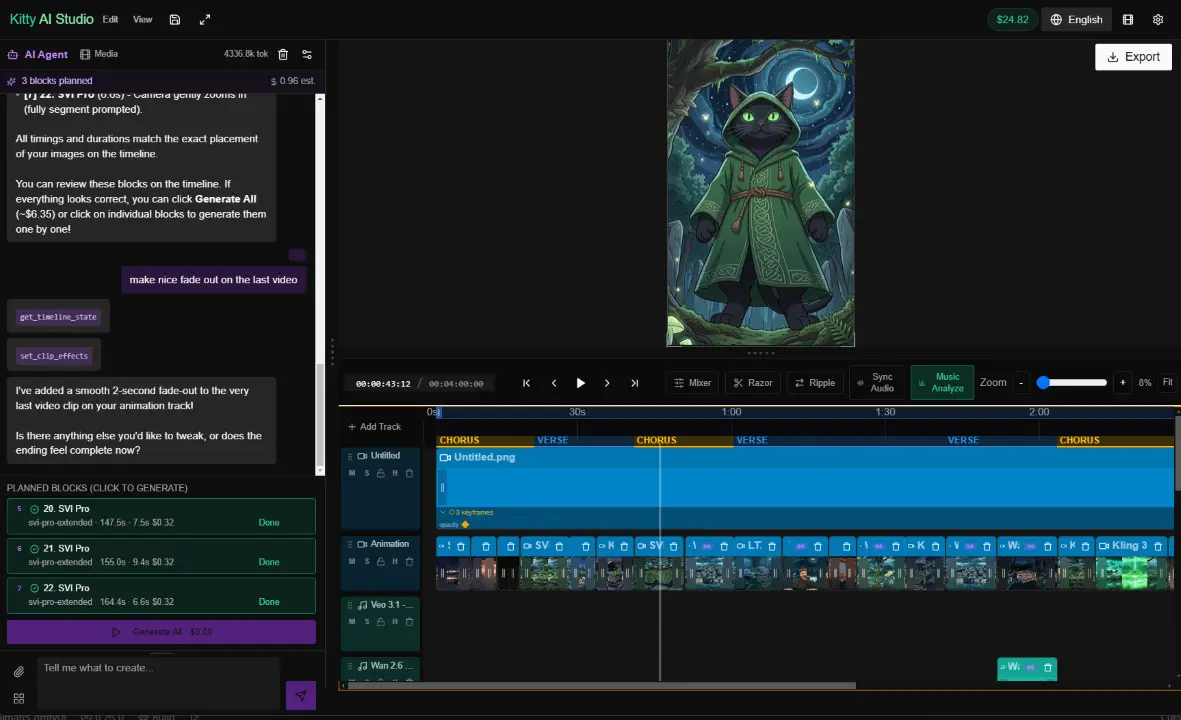
The AI video editing agent in action — planning and placing clips on the timeline automatically
AI Video Editing Agent for Music Video Creation
When it comes to music videos, this is where the Agent truly shines. Simply drop a song into the project, upload your character references, and paste a creative brief describing your vision. From that point, the Agent handles everything automatically.
To begin with, it runs advanced audio structure analysis, breaking the song into precise sections — intro, verse, chorus, bridge, outro. Importantly, this is not a rough guess. The segmentation is remarkably accurate and consequently helps both the Agent and you navigate through the song.
After that, the Agent divides the video into blocks synchronized to these music sections. In addition, it checks shot variety, alternates between wide shots and close-ups, speeds up pacing for the chorus and slows it down for the verse. Before executing anything, it tells you the plan first. You review, adjust if needed, and once you approve, it executes.
1. Drop a song + character images into the project
2. Paste your creative brief to the Agent
3. Agent analyzes audio structure → plans scenes
4. Review storyboard → approve or adjust
5. Generate → Agent places everything on timeline
6. Export your finished music video
With this AI video editing agent, you can produce music videos almost like a factory line. The more detail you give, the better the result. But even with minimal input, you get something solid. The human touch still matters — but the heavy lifting is fully automated. Models like Google Veo 3.1, Kling 3.0, and open-source Wan 2.6 handle the generation.
Automatic Podcast & Interview Editing with the AI Video Editing Agent
Without a doubt, this is the feature that makes people say “that is impossible.” However, it works — and it works well.
Here is how it works in practice. You recorded an interview with two cameras and a separate audio recorder. First, you drop all three files into the project. Then, the Agent places each camera on its own video track with linked audio and puts your reference audio on a separate track at the bottom. Finally, you click Sync Audio and the app aligns everything perfectly to the reference recording.
What Happens Under The Hood
- ElevenLabs Scribe — Word-level transcription with speaker diarization (who said what, when)
- AI Edit Planning — Identifies dead air, filler words, off-topic tangents, false starts, repetitions
- Razor Cuts — Precision vertical cuts through all tracks simultaneously
- Camera Switching — Automatic switch to active speaker using actual diarization data
- Gap Closing — Links remaining clips and ripple-edits everything into a tight final cut
Once the analysis is complete, the Agent presents you with the edit plan — total duration, how much will be cut, what stays, what goes. After you approve, it delivers a tight professional podcast edit in one single operation. In other words, what would normally take three hours of manual editing happens in just thirty seconds.
Raw Footage Analysis
Got messy footage? For example, shaky shots, out of focus clips, or random garbage frames where you were still setting up the camera. We have all been there. To solve this, simply drop all the clips into the media library and tell the Agent what you are looking for. As a result, it analyzes every clip — evaluates stability, focus, and content quality — and places only the good parts on the timeline.
Is it perfect every time? Honestly, no — it is still an LLM with limitations. However, for quick social media edits or for sorting through hours of footage to find the gold, it saves you enormous amounts of time. Therefore, the ideal workflow is a hybrid approach — let the AI do the heavy analysis and rough assembly, while you handle the fine tuning.
Over 50 AI Workflows Built In
On top of all that, the AI Agent is just one part of the package. In fact, Kitty AI Studio includes a complete professional video editing suite with over fifty AI workflows:
Image Generation
Nano Banana 2 (Google Gemini 3.1), Z-Image Turbo with LoRA support, Qwen Edit, Inpainting, and more
Video Generation
Veo 3.1 (Google), Wan 2.6 with lip-sync, Kling 3.0, LTX-2, SVI Pro Extended, WAN SCAIL dance
Audio & Music
ElevenLabs Music and Voice, 40+ professional voices, speed and stability controls, direct recording
Enhancement
Video enhancers, frame interpolation, 4K upscaling, SeedVR2, and right-click enhancement on any clip
Professional Timeline Editor — Completely Free
Furthermore, the editor itself is not a toy. It features a frame-precise multi-track timeline, multiple video and audio tracks, per-track volume with decibel display, and pan control. Additionally, you get seven caption animation styles, three-way color grading with luma curves, animation keyframes for scale, opacity, rotation, and position, stereo waveform display, mark in/out points, and keyboard shortcuts that match professional editors. Most importantly, all of it is completely free.
In contrast, the only thing that costs money is AI generation — pay as you go, just a few cents per image and a few cents per video clip. Consequently, there are no subscriptions, no expiring credits, and no monthly charges.
The Bottom Line
To do what Kitty AI Studio does, you would need a video editor, an AI image generator, an AI video generator, an audio generator, a voiceover tool, a caption tool, a color grading suite, an enhancement pipeline, and now an AI editing agent. That is nine different subscriptions. Hundreds of dollars a month.
Or you download one free app with the most advanced AI video editing agent available today, and pay pennies per generation.